
Download ConverTable Units – Powerful Unit Converter for macOS
Overview
ConverTable Units is a lightweight, trial‑version utility designed for macOS users who need to switch between more than 450 measurement units quickly and accurately. Belonging to the Science & Education category with a focus on calculators and unit converters, this app has been part of the Mac software catalog since 2006. Although its download numbers have slowed recently, the program remains a solid choice for students, engineers, scientists, and hobbyists who value a fast, offline conversion tool without the bloat of modern cloud‑based services.
The current build, version 2.6.2, was last updated on May 11 2006, and it runs on Mac OS X and earlier releases. Its small footprint means it occupies far less disk space than most competing conversion suites, making it ideal for older Macs or systems with limited storage. ConverTable Units supports English language UI, provides a clean, single‑window interface, and offers a trial period that lets users explore the full feature set before deciding on a purchase.
Key Features and Functionality
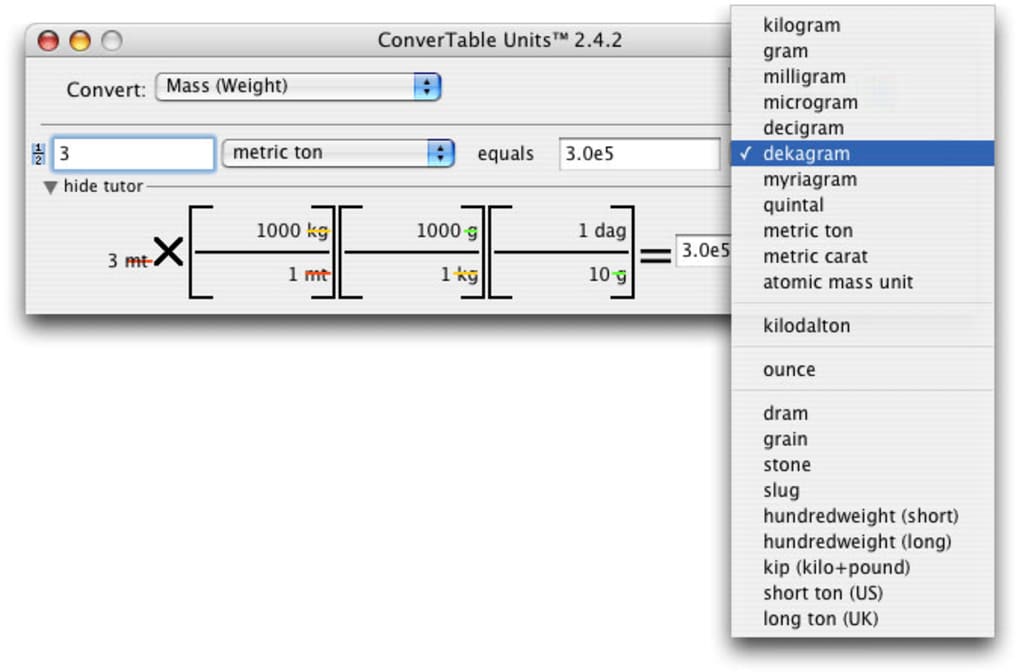
- More than 450 built‑in units covering categories such as length, mass, temperature, pressure, energy, and data storage.
- Instant conversion results displayed as you type, eliminating the need for separate “convert” buttons.
- Customizable favorite units list, allowing you to pin the most frequently used measurements for one‑click access.
- Batch conversion mode, which lets you paste a list of values and receive a column of converted results in seconds.
- Offline operation – no internet connection required, ensuring privacy and speed even on isolated networks.
- Simple drag‑and‑drop interface for moving values between conversion fields.
- Support for scientific notation, useful when dealing with very large or very small numbers.
- Export options to plain text or CSV for easy integration with spreadsheets and lab reports.
- Regular (though infrequent) updates that keep the unit database aligned with international standards.
- Lightweight installer under 5 MB, leaving ample free space on older Mac systems.
Each feature has been crafted with a focus on speed and usability. For example, the batch conversion mode saves time for researchers who need to process large datasets, while the favorite units list reduces repetitive navigation. Because ConverTable Units runs locally, it avoids the latency and privacy concerns associated with web‑based converters. The inclusion of scientific notation and CSV export means the app fits naturally into academic workflows, letting users copy results directly into lab notebooks or data analysis tools without manual reformatting.
Installation, Usage & Compatibility
Step‑by‑Step Installation
- Download the ConverTable Units.dmg file from the official product page.
- Open the DMG and drag the ConverTable Units icon to your
/Applicationsfolder. - Double‑click the app to launch it for the first time; macOS may prompt you to confirm that you trust the developer.
- Accept the trial license agreement, then start converting units immediately.
The installer is intentionally minimalistic—no additional toolbars, adware, or background services are added to your system. Once installed, the app can be launched from the Dock, Launchpad, or Spotlight search. Because it’s a trial version, you’ll see a subtle “Trial – Purchase Full Version” banner after 30 days of usage; purchasing the full license removes the banner and unlocks unlimited conversions.
Operating System Support
ConverTable Units is compatible with macOS 10.3 (Panther) through macOS 10.6 (Snow Leopard) and earlier PowerPC‑based versions of Mac OS X. The software is not optimized for the latest macOS releases (Catalina, Big Sur, Monterey, Ventura) but can still run under Rosetta 2 on Apple Silicon Macs if legacy support is enabled. Users on newer macOS versions should consider running the app in a virtual machine or using an older Mac to enjoy full functionality.
First‑Time User Experience
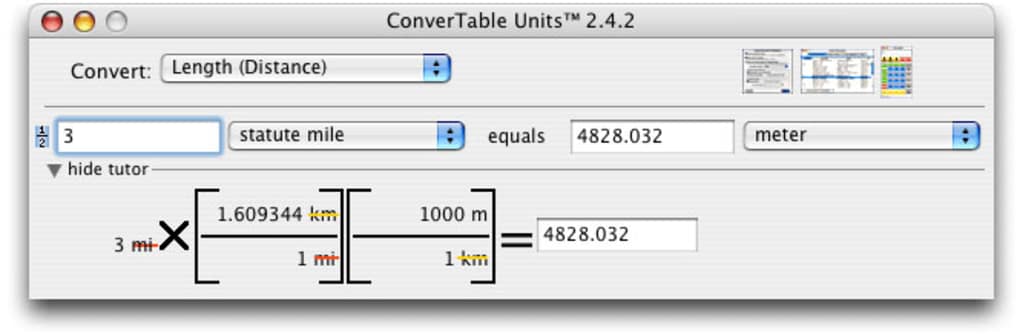
When you open ConverTable Units, the main window presents two drop‑down menus—one for the source unit and one for the target unit—flanked by a numeric entry field. Simply type the value you wish to convert, select the appropriate units, and watch the result appear instantly. The interface also includes a “History” pane that records the last ten conversions, allowing you to revisit recent calculations without re‑entering data. Keyboard shortcuts (⌘+C for copy, ⌘+V for paste) work seamlessly, and the app respects macOS’s native dark mode for comfortable use in low‑light environments.
Pros, Cons & Frequently Asked Questions
Pros
- Extensive library of over 450 units, covering most scientific and everyday needs.
- Zero‑internet requirement ensures fast, private conversions.
- Very small installation size—under 5 MB—leaving ample disk space.
- Intuitive UI with real‑time results, reducing the learning curve.
- Batch conversion and CSV export streamline workflow for researchers.
Cons
- Last major update was in 2006; no native support for macOS 11+ without workarounds.
- Trial version displays a purchase banner after 30 days, which some users may find intrusive.
- Lacks integration with modern cloud services or mobile platforms (iOS/Android).
- No built‑in help wizard; users must rely on the PDF manual for advanced features.
- Limited language support—English only.
FAQ
Can I use ConverTable Units on the latest macOS versions?
The software was built for macOS 10.3–10.6 and does not have official support for macOS 11 (Big Sur) or later. However, you can run it under Rosetta 2 on Apple Silicon Macs or inside a virtual machine that emulates an older macOS environment.
Is the trial version fully functional?
Yes, the trial version provides access to the complete set of 450+ units and all conversion features. After 30 days a non‑intrusive banner reminds you to purchase the full license, but the software continues to work without restrictions.
How do I export conversion results?
From the batch conversion window, click the “Export” button and choose either plain‑text (.txt) or CSV (.csv). The exported file can be opened in any spreadsheet program such as Excel, Numbers, or Google Sheets.
Does ConverTable Units support custom units?
The trial version does not include a custom‑unit editor. The full license unlocks a “User Defined Units” panel where you can add new conversion formulas based on existing units.
Is there any way to get technical support?
Support is provided via email for licensed users. Trial users can access a publicly available PDF manual and a community forum where other macOS users share tips and workarounds.
Conclusion & Call to Action
ConverTable Units remains a solid, no‑frills unit conversion tool for macOS enthusiasts who value speed, privacy, and a tiny disk footprint. While its age shows in the lack of native support for the newest macOS releases, the core functionality—over 450 units, real‑time conversion, batch processing, and CSV export—still holds up for academic, engineering, and everyday scenarios. If you work on an older Mac or need a reliable offline converter, downloading the trial version is a risk‑free way to evaluate whether the feature set meets your needs. Should you find the app useful, purchasing the full license removes the trial banner and unlocks custom unit creation, giving you a lifelong conversion companion.
Ready to simplify your calculations? $Free trial download is just a click away.
Overall Rating: 4.2/5
ConverTable Units delivers a surprisingly comprehensive unit library in a compact package. Its main drawbacks are outdated macOS compatibility and the lack of modern UI polish, but the core conversion engine is fast, accurate, and completely offline. Ideal for students, engineers, and anyone who prefers a native Mac app over cloud services.







